We've moved! Visit
The Keyword
for all the latest stories about
life at Google
and our
student programs
.
Student Blog
Brought to you from your @GoogleStudents friends. From pre-university to PhD (and beyond), we got you.
Student Tip: Using Google Calendar for Student Groups
January 13, 2011
Paula is a Senior at the University of Illinois at Urbana-Champaign, double-majoring in marketing and management. Here she shares how several student organizations she works with, such as American Marketing Association and International Impact, have utilized Google Calendar to manage scheduling. If you have a tip to share on this blog,
let us know
!
Like most outgoing students on today’s college campuses, I’m sure you’re involved with several student organizations. You probably even serve on a few executive boards or college councils. With this increased involvement, students need a way to organize their busy schedules and prioritize their time among several responsibilities. The solution – Google Calendar!
Google Calendar
is so valuable for student organizations such as student senate, service clubs, sororities and fraternities, and sports teams because you can easily create a single calendar to share with all of your group members. This calendar can be accessed any time (from any device) and can be added to members’ personal Google Calendars. This will ensure that members always have the most up-to-date information about meetings, events, and more.
Google Calendars can also be embedded on your student organization’s website using the Calendar Address in Settings. Executive board members of your student organizations can also have access so that they can make changes to the calendar. That way, student members know if there is a cancelled meeting or event location change, without receiving mass emails. Trust me, I know a thing or two about getting too many emails, too!
The benefits of using Google Calendar for student organizations really revolve around the student members. In my experience, serving on two executive boards last semester, using Google Calendar has made it easier for members to keep up with meetings and stay involved. And better informed members equals more successful student organizations. So happy scheduling!
Posted by Paula Guzman, University of Illinois at Urbana-Champaign
Google Science Fair seeks budding Einsteins and Curies
January 10, 2011
(Cross-posted on the
Official Google Blog
,
Google Docs Blog
, and
Google LatLong Blog
)
Are you a student who loves science? Do you have a good idea for an experiment that you’d like to share with the world? In 1996, two young computer science students, Larry Page and Sergey Brin, had a hypothesis that there was a better way to find information on the web. They did their research, tested their theories and built a search engine which (eventually) changed the way people found information online. Larry and Sergey were fortunate to be able to get their idea in front of lots of people. But how many ideas are lost because people don’t have the right forum for their talents to be discovered? We believe that science can change the world—and one way to encourage that is to celebrate and champion young scientific talent as we do athletes and pop idols.
To help make today’s young scientists the rock stars of tomorrow, in partnership with CERN, The LEGO Group,
National Geographic
and
Scientific American
, we’re introducing the first global online science competition: the
Google Science Fair
. It’s open to students around the world who are between the ages of 13-18. All you need is access to a computer, the Internet and a web browser.
You may have participated in local or regional science fairs where you had to be in the same physical space to compete with kids in your area. Now any student with an idea can participate from anywhere, and share their idea with the world. You build and submit your project—either by yourself or in a team of up to three—entirely online. Students in India (or Israel or Ireland) will be able to compete with students in Canada (or Cambodia or Costa Rica) for
prizes
including once-in-a-lifetime experiences (like a trip to the Galapagos Islands with a National Geographic Explorer), scholarships and real-life work opportunities (like a five-day trip to CERN in Switzerland). And if you’re entering a science fair locally, please feel free to post that project online with Google Science Fair, too!
To enter,
register online
and create your project as a
Google Site
. Registration is open through April 4, 2011. Please note: you must get parental or guardian consent in order to compete. You can check out the complete rules
here
. After April 4, we’ll begin judging and will announce our semi-finalists in early May.
The semi-finalist projects will be posted on our online gallery, where we’ll encourage the public to vote for a “people’s choice” winner. From our list of semi-finalists, we’ll select 15 finalists to bring their projects to Google headquarters on July 11 to compete in our final, live event, where world-renowned science
judges
will select a winner in each age category, as well as a grand-prize winner.
Here's an example
of a great science fair project site to inspire you. We asked Tesca, a U.S. high school senior from Oregon, to create it for us based on an award-winning project she’s been working on for years. Tesca’s objective is to make hospitals more efficient using artificial intelligence—a world-changing goal, to be sure.
So if you think you're the next Albert Einstein, Marie Curie—or Larry Page or Sergey Brin—sign up today for the Google Science Fair. Prove once again how science can change the world!
Posted by Cristin Frodella and Samantha Peter, Education Product Marketing Managers
Introducing the Google Science Fair!
January 10, 2011
(Cross-posted on the
Google Docs blog
)
Are you a 13-18 year old who loves science? If you are or know someone who is, you’ll be psyched to know that Google is announcing the first ever global online science competition, the Google Science Fair, tomorrow, Tuesday January 11th.
To celebrate our launch, we’re hosting a live event on
youtube.com/googlesciencefair
tomorrow, on January 11th at 9am EST. Tune in to get details about how you can submit your own project online and be inspired by some famous scientists so you'll be ready to prove you're the next Albert Einstein, Marie Curie or Dean Kamen.
Posted by Cristin Frodella, Senior Product Marketing Manager, Education
What do you want to hear about in 2011?
January 5, 2011
As you get back into the swing of school again after what we hope was a nice and restful holiday break, we'd love to know what you want to see from this blog in 2011. We enjoyed sharing all kinds of product launches, program announcements, and fun news with you guys last year and now we want to know what you hope to see done differently for next year.
So please let us know what would help you get the most out of the Google for Students blog by leaving a comment on this post.
Thanks for reading in 2010 and here's to more good things to come this year and beyond!
Posted by Google Student Blog Team
How to change the screensaver on a Mac
December 24, 2010
This post is the last edition of the
“Teach Your Parents Tech” series
where Googlers help provide some tips and tricks you can gift your parents with this Holiday Season.
Like most people, I look forward to going home for the holidays and enjoying the good food, good company and much needed rest and relaxation. But as the techie in the family (read: I know what the control panel does), I also look forward to setting my parents up with whichever ‘cool’ technologies the evening news happened to mention since the last time I was home. This year I’m guessing I’ll be opening up a Twitter account for Dad and downloading Angry Birds for Mom.
Any time I go home though, I also try to teach them something they’ll be able to do themselves later on. This time, I’m going to show my parents how to change a screensaver on a Mac. Of course, first I’ll have to explain to them what the screensaver is. Here's how I imagine this conversation going:
Me: Want to see how to change your screensaver?
Mom: Sure... what’s a screensaver?
Me: That program on your computer that shows pictures of the family when you’re away.
Mom: Why does my computer show pictures of us when I’m away?
Dad: Computers get lonely, too.
(My dad is the comedian in the family, clearly.)
So instead of going through all that, I decided I’d just make this video instead. A bunch of my friends made videos, too, which you've probably seen over the last few weeks. We figured if we use Youtube to cover the computer stuff, you’ll have more time to play snow football. Of course, you might still have to teach your parents how to watch Youtube videos...
Hopefully you and your parents will find value in these videos, and Happy Holidays!
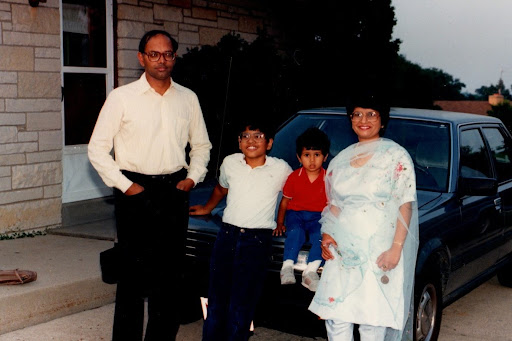
My mom, dad and brother and me circa when plastic glasses frames were cool the first time.
Posted by Gopal Shah, SketchUp Marketing
Spell “oscilloscope” perfectly
December 23, 2010
This post is part of the
“Teach Your Parents Tech” series
where Googlers help provide some tips and tricks you can gift your parents with this Holiday Season.
In my video for my family, I demo a quick way to get the correct spelling of a word. Instead of using a spell checker or a physical dictionary (so 90’s), you can use familiar Google Search to learn whether to write “
sharlaton
” or “charlatan,” for example.
This trick even works when communicating with relatives who speak a different language. When I want to wish my mom’s Swiss family and friends a happy new year, I can type “es guetes Nöis” into the Google Switzerland search bar. Google returns the correct spelling “
es guets Nöis
”, scoring me kudos with the family until the next year’s holidays.
My mom, brother, and me wearing our fashionable holiday finest
Posted by Nathalie Arbel, Local Marketing
Google Scholarships - Now Accepting Applications!
December 22, 2010
As part of Google’s ongoing commitment to advancing computing and technology, we are pleased to support the work of our partner organizations in providing scholarships to students studying computer science.
We are excited to announce the following scholarship opportunities in the United States-- Now accepting applications!:
Google Lime Scholarship for Students with Disabilities
- February 6, 2011
Google AISES Scholarship
- Deadline: February 15, 2011
Google Hispanic College Fund Scholarship
- Deadline: March 1, 2011
In addition, we are still accepting applications for the
Google Anita Borg Memorial Scholarship
(Deadline: February 1, 2011), and in a few weeks, we will also be opening applications for the Google United Negro College Fund Scholarship.
Scholarship recipients will each receive a $10,000 scholarship for the 2011-2012 academic year and be invited to attend the all-expense-paid Annual Google Scholars’ Retreat at the Googleplex in Mountain View, CA. Scholarships will be awarded based on the strength of applicants’ academic background and demonstrated passion for computer science.
For complete details on all of our scholarships, please visit
www.google.com/jobs/scholarships
.
Giving the Gift of Email
December 22, 2010
This post is part of the
“Teach Your Parents Tech” series
where Googlers help provide some tips and tricks you can gift your parents with this Holiday Season.
When I go home for the holidays, I usually brace myself for a couple things: cold weather, fighting over the remote with my sister, and the shocking state of my parents’ overflowing email inboxes. Last year my mom asked me how I kept track of it all, and I gave her her favorite Christmas gift yet: teaching her how to start fresh with a new email address.
Maybe, like my dad, you created your email address 15 years ago when your family first got dial-up internet, and it’s time for an update. Or maybe you’ve been hearing your kids brag about a cool email service provider that you’d like to try out. Regardless of why you want to switch, a new email address is a great way to start the new year off with a clean slate and a clean inbox.
If you ask my mom why she switched to Gmail, she might say that she likes using labels to organize her inbox, or that she can archive messages without actually deleting them. But really, I think it’s because after the holidays are over and my sister and I head back across the country, she can chat with us through Gmail whenever she wants. Just ask her what her new favorite emoticon is (hint: it’s the heart! <3).
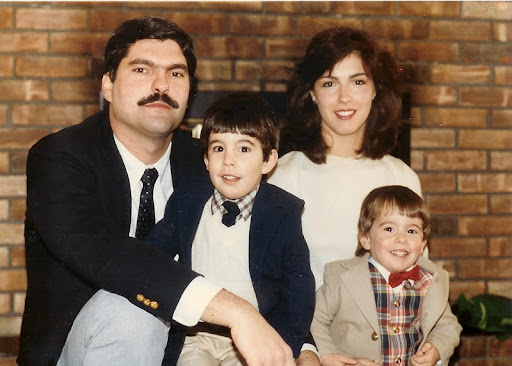
My mom, sister, me, and dad, reveling in the glory of the 90s.
Posted by Lauren Barbato, Online Sales
How to transfer naked baby photos to your mom’s computer
December 21, 2010
This post is part of the
“Teach Your Parents Tech” series
where Googlers help provide some tips and tricks you can gift your parents with this Holiday Season.
Sharing photos, documents, video and other files with my family is something I frequently do around the holidays. In particular, I find myself sharing photos of my recent adventures and happenings with my parents.
My Dad is a big photography buff and tech geek (Love you, Dad :) ). Growing up, he always had a nice camera draped around his neck and recently he digitized (scanned) our thousands of family photos and put them onto the home computer. So, we have a stockpile of photos of my basketball games, my sister’s horse shows, naked baby bubble baths, easter egg hunts, trips to the beach, etc.
My Mom is not a tech geek. Recently she told me that she has heard of copy and paste, but doesn’t know how to use it. I recently taught her how to text message and my sister taught her how to book airfare online. However, my mom loves to look at family photos. The easiest way I’ve found to trasnfer photos onto my mom’s computer is by using a USB stick. I hope with the following video, I’ll be able to teach my mom how to transfer photos at any time:
For more videos of Googlers teaching their parents tech, check out
TeachParentsTech.org
.
My mom, me, and dad near Lake Tahoe, CA many summers ago.
Posted by Will Patrick, Enterprise Marketing Team
Holiday tips for Google Calendar
December 20, 2010
The end of the year is such an exciting time – classes are just about over and the holidays are coming. But things can also be a little stressful while you’re wrapping things up. Whether you need to schedule time to study for all your exams or just need to remember to buy a gift for your grandma, here are some Google Calendar features that will help make your life easier for the remainder of 2010.
1. Tasks
Have a lot to remember? Make a
to-do list
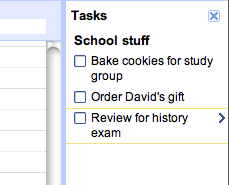
! Activate tasks by clicking the Tasks calendar listed under My calendars. You’ll see the Tasks pane expand on the right. Attach a due date to an existing task by clicking the right arrow next to the task, then clicking on the calendar icon to select a date.
2. Event time zones
This new feature
is great if you're traveling for the holidays. Use it to plan events in whatever time zone you’ll be in, or even schedule flights with different departure and arrival time zones.
3. SMS notifications
Get event reminders on the go by setting up SMS notifications. After
registering your mobile phone
, set SMS reminders for individual events within the event page, or create
default SMS notifications
so you won’t miss a thing.
4. Quick Add
If you’re really in a hurry, use
Quick Add
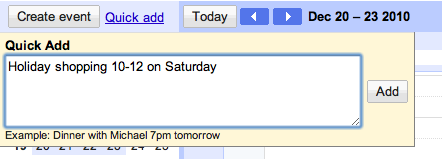
to create events on your calendar. Just click the Quick Add link and type the details of your event (like "Study group at 6PM tomorrow in Gilchrist Hall") and Quick Add will pop the event on your calendar.
5. Background image
This one’s just for fun! Change your calendar background to something festive by first
enabling the Lab
, and then going to Calendar settings to choose your image.
Get started using Google Calendar
to make your life easier over these next few weeks, or check out our
Getting Started Guide
to learn more. Happy holidays!
Posted by Alice Brown, Google Calendar Team
Copying and pasting - not as ubiquitous as you think
December 20, 2010
This post is part of the
“Teach Your Parents Tech” series
where Googlers help provide some tips and tricks you can gift your parents with this Holiday Season.
Copying and pasting definitely would have come in handy back in 1996 when I was typing out college application after college application, one by one, on my (at the time) super sophisticated word processor. Thankfully, my mother split the process up with me and helped me crank out 6 neatly typed applications, with minimal need for White Out.
Fast forward to 2010. I was at home chatting with my mom as she filled out an offer for one of her clients (she’s a real estate agent), when I noticed that she was typing each of her clients’ names, letter by letter, over and over again throughout the form.
And that’s the moment that copying and pasting forever changed her life.
Posted by Michael Bolognino, Product Marketing Manager
Labels
A Day in the Life of a New Grad in Google Dublin
7
AdCamp
2
AdMob
11
Ambassador Program
14
APAC
7
Appy Trails
28
Back to School
4
Better Know a New Grad
1
Better Know an Intern
15
Better Know an Office
4
Black History Month
10
Caitlin Talks to an Engineer
9
Chrome Extensions
3
Chromebook
1
College Tips by Google
1
Community
14
Conferences
16
consortium
1
CSSI
5
Day in the Life
2
deSTEMber
1
Development Programs
1
Diary of a Business Associate Intern
1
Diary of a Summer Intern
41
Diary of a Summer Intern - Erika
9
Diary of a Summer Intern - Franklin
3
Diary of a Summer Intern - Jess
3
Diary of a Summer intern - Luke
3
Diary of a Summer Intern - Madelaine
4
Diary of a Summer Intern - Pablo
3
Diary of a Summer Intern - Rio
4
Diary of a Summer Intern 2012
18
Diary of an MBA Intern
2
Education
19
EMEA
47
Europe
8
Events
13
Exploring Design at Google
4
GHC15
6
Going Green
6
Gone Google
2
Google Code University
1
Google Code-in
1
Google Games
3
Google Japan
1
Google Lime Scholarship
1
Google on campus
2
Google Online Marketing Challenge
10
Google Science Fair
2
Google.org
1
Google+
6
Googlers
14
Googlers Beta
11
Grace Hopper
11
GradTips
9
Hangouts On Air
21
Inside ITRP
6
Intern Insights
31
Intern Program
72
Interns Making an Impact
7
Interviews
1
Jobs
5
just for fun
30
K-12 (Pre-university)
14
LATAM
3
Life at Google
17
Middle East
1
My Path to Google
45
My Summer at Google
15
My Summer at Google 2012
10
North America
4
Office Environment
4
Open Source
9
PhD
7
Products
94
Programs and Competitions
116
Recruiter Tips and Tricks
15
Rice Plus
4
Scholarships
56
Search
1
STEM
2
STEP
1
Student Tips
15
Students
13
Summer of Code
1
Teach Parents Tech
10
Tech Students
3
Tips and Tricks
27
Women in Engineering
21
Young Innovators
10
YouTube
3
Archive
2020
Jul
May
Mar
Feb
Jan
2019
Dec
Nov
Oct
Sep
Aug
Jul
Jun
May
Apr
Mar
Feb
Jan
2018
Dec
Nov
Oct
Sep
Aug
Jul
Jun
May
Apr
Mar
Feb
Jan
2017
Dec
Nov
Oct
Sep
Aug
Jul
Jun
May
Apr
Mar
Feb
Jan
2016
Nov
Oct
Sep
Aug
Jul
Jun
Apr
Mar
Feb
Jan
2015
Dec
Oct
Sep
Aug
Jul
Jun
May
Apr
Mar
Feb
Jan
2014
Dec
Nov
Oct
Sep
Aug
Jul
Jun
May
Apr
Mar
Feb
Jan
2013
Dec
Nov
Oct
Sep
Aug
Jul
Jun
May
Apr
Mar
Feb
Jan
2012
Dec
Nov
Oct
Sep
Aug
Jul
Jun
May
Apr
Mar
Feb
Jan
2011
Dec
Nov
Oct
Sep
Aug
Jul
Jun
May
Apr
Mar
Feb
Jan
2010
Dec
Nov
Oct
Sep
Aug
Jul
Jun
May
Apr
Mar
Feb
Jan
2009
Dec
Nov
Oct
Sep
Aug
Jul
Jun
May
Apr
Mar
Feb
Jan
2008
Dec
Nov
Oct
Sep
Feed
Follow @GoogleStudents
Interested in opportunities and programs for students? Visit
google.com/students
.