We've moved! Visit
The Keyword
for all the latest stories about
life at Google
and our
student programs
.
Student Blog
Brought to you from your @GoogleStudents friends. From pre-university to PhD (and beyond), we got you.
Explore our U.S. Presidents on a map
February 18, 2011
[Cross-posted from the
Official Google Blog
and
Google Lat Long blog
]
When I was in elementary school, I got two days off every February; one for George Washington and another for Abraham Lincoln. I remember classrooms were usually wallpapered with a potpourri of decorations left over from Valentine’s Day and token silhouettes of these two Presidents thumb-tacked to the bulletin board. My teachers would talk about the significance of the holiday during class but with lack of visuals to pique my interest, it was always hard to retain (and fully enjoy!) the information. With that in mind, we’re pleased to celebrate the President’s Day holiday in the U.S. by letting you go back in time to learn more about our past presidents in a visually fun and interactive way.
We’ve created a
U.S. Presidents Showcase
to map the birthplaces of all 44 presidents, and provide details about their presidential terms, using the
Google Earth
plug-in. You can also see the states that voted during each president’s election by clicking on the tours in the left column of the showcase.
Whether you’re a history buff or simply curious to learn more about U.S. presidents, we hope you enjoy exploring a little further using Google Earth. In addition to the
U.S. Presidents map
, educators can use some of our other
resources
in their classroom to explore more aspects of history. Here are a few ideas:
Explore the White House, Washington Monument, Lincoln Memorial and other
historical monuments in 3D
and have students explain how architecture is used to honor people, concepts and establishments
View a 3D model of
Valley Forge National Park
in Google Earth
View a copy of the
Emancipation Proclamation
signed by Abraham Lincoln and map the areas where slavery ended, as well as the areas that were not initially covered by this executive order
Discuss the famous painting “
Washington Crossing the Delaware
” by German American artist Emanuel Gottlieb Leutze and use the
ruler tool
in Google Earth to measure the width of the Delaware River
We hope you have fun
exploring and learning
a little more of the history behind the President’s Day holiday. And when you’re done, go out and enjoy your day off!
Posted by Tina Ornduff, Geo Education Program Manager
Using my maps for your summer sublet
February 16, 2011
[Cross-posted from the
Google Lat-Long Blog
]
Katie is an Electrical and Computer Engineering student at University of Colorado, Boulder. She loves to use My Maps and her favorite map is one she created to keep track of her world travels, with all the countries she’s visited and a link to her Picasa Web Album for that trip. If you have a tip to share on this blog,
let us know
!
The spring semester ends, and the frenzy begins: Quick, everyone find someone to sublet your apartment for the summer!
Hundreds of students in your university town will be simultaneously advertising their apartments to potential summer subletters. How can you help your apartment stand out among the crowd? Bring in Google Maps to save the day. Google Maps has a feature known as My Maps, which enables you to quickly and easily build a personalized map highlighting the locations you care about -- all on one map! Simply share the map link with your family or friends to let them see it too.
Everyone knows that when looking for a summer sublet, it’s all about location, location, location. Where are the closest grocery stores? What’s fun to do nearby? There’s a running path along the creek just two blocks away? And the local bus picks up on the corner? Nothing sells these points better than an easy, personalized map.
It only takes minutes to create your own My Map. To start, sign in to your Google account and go to
maps.google.com
. Click on the link in the upper-left corner labeled “My Maps.” By clicking the “Create new map” link, you can pick a title and get to building your housing map.
To start finding locations of interest and placing them on your new My Map, search for those places in Google Maps, for example “park in boulder co.” After finding the location you are interested in, simply click on the red pin on the map, followed by the “Save to...” link. From here you can easily select the new My Map you created.
After adding a number of specific locations to your map, you can also customize and edit the map to fit your style preferences. To access your map thus far, click on the “My Maps” link in the top left corner of the page, and select the map you are interested in editing. By clicking the “Edit” button, you are now in editing mode on the map and can easily make changes to the names of locations or the style of icon. To make a change to a specific place, just click on that location. On the map, an editable box appears where you can easily make changes, such adding as some notes about the place.
The end product is a unique map showcasing why your sublet is the right option to pick. Here’s an example I used for an apartment in Boulder, Colorado.
Stand out in your next apartment rental posting with My Maps today!
Posted by Katie Corner, University of Colorado
Pin your love on the map
February 14, 2011
(Cross-posted from the
Lat Long Blog
)
This Valentine’s Day, tell your friends, family or significant other that you love them with a fun message from Google Maps.
Location can be a powerful trigger of memories—from the Italian place in San Francisco where you went on your first date to the cabin you rented at Lake Tahoe with your roommates. For that reason, we thought it would be great to create a
Valentine’s Day card
that’s tied to a specific location. As long as there’s a place that means something special to you and the ones you love, mapping your valentine is a great way to make Valentine’s Day a little more special.
One of my favorite memories is from a family trip we took to Eilat in Israel (check out my awesome fashion sense, I’m on the far left...), so I sent my parents this card:
I hope you'll take a moment to remind the people you love of the places you've shared with them. Visit
www.mapyourvalentine.com
to get started.
Happy Valentine's Day from Google!
Posted with love by Aaron Weissman, Google Maps & Earth Team
Announcing: Code Jam Africa & Arabia
February 8, 2011
Do you love solving complex problems? Do you code in your sleep? Are you a student at an African or Arabic university? Are you interested in internships at Google?
If so,
Code Jam Africa & Arabia
is for you!
Code Jam AA is a new coding competition for African and Arabic computer science students. It's your chance to try your skills against fellow coders and algorithmic whizzes! Google engineers have been hard at work developing a set of brainteasers designed to challenge your CS know-how. Think you can beat them? You might win a t-shirt or special prize pack. Interested in Google internships? Register now and let us know! Outstanding performance in Code Jam AA 2011 may be considered if you apply for an internship at our European Headquarters in Zurich, Switzerland.
Register now at:
http://code.google.com/codejam/africa_arabia/
If you want to spread the word at your local university, feel free to print and distribute
this leaflet
.
Important dates
Qualification Round: Thursday, February 17, 2011 at 12:00 UTC (noon GMT)
Online Final Round: Thursday, February 24, 2011 at 17:00 UTC (5:00 PM GMT)
Need even more coding? Ready to take on the world? Stay tuned for Google's global
Code Jam 2011
!
Posted by Noha Salem, University Programs Specialist
Explore museums and great works of art in the Google Art Project
February 2, 2011
Yesterday
we announced
the
Art Project
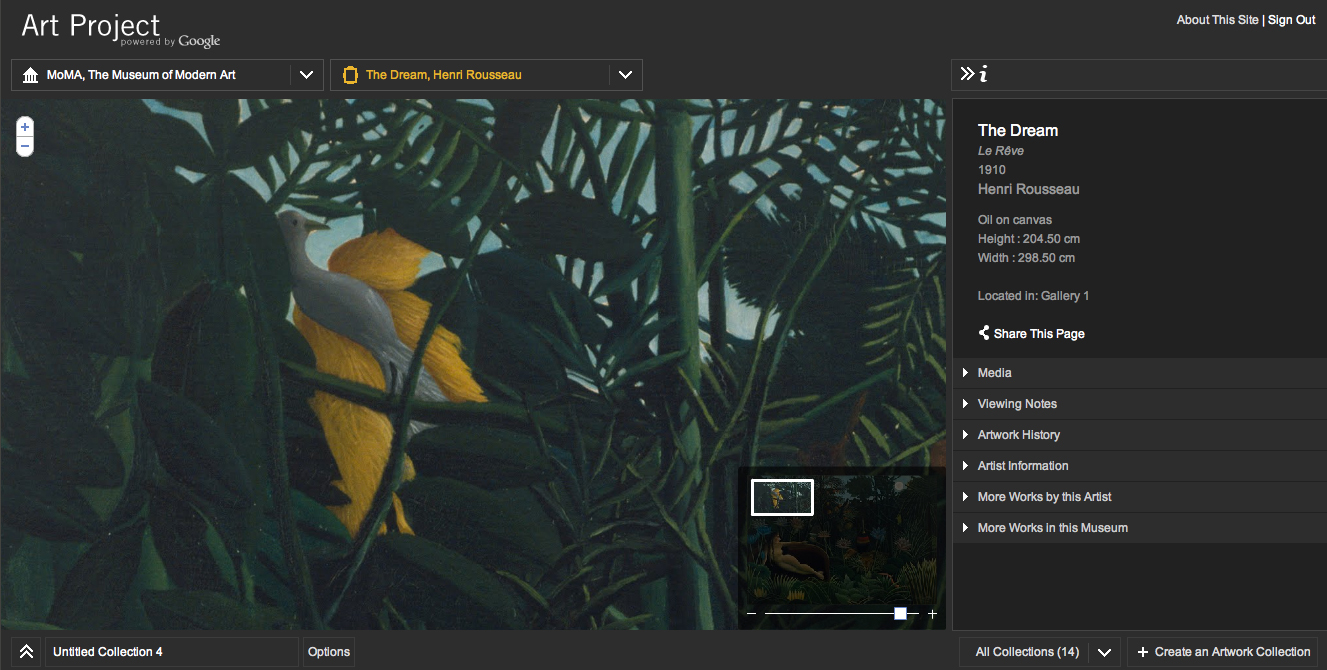
- a new site that lets you explore hundreds of artworks from 17 of the world’s most acclaimed art museums in extraordinary levels of detail, as well as take 360 degree tours of the museums using Street View technology. The combination of 1000+ artworks, from more than 400 artists, with Street View of the museums, creates a completely new way to discover art online.
The Street View technology allows you to take a virtual tour inside museums from 11 cities across the world -- including The Metropolitan Museum of Art and MoMA in New York, The State Hermitage Museum in St. Petersburg, Tate Britain & The National Gallery in London, Museo Reina Sofia in Madrid, the Uffizi Gallery in Florence and Van Gogh Museum in Amsterdam.
Each museum features a super high resolution image, which in combination with a custom built viewer, enables previously hard to-see elements of an artwork suddenly become clear—such as the tiny Latin couplet which appears in Hans Holbein the Younger’s
‘
The Merchant Georg Gisze
.
’ The resolution, combined with the custom built viewer, enables you to discover minute aspects of paintings you may never have seen up close before, such as the miniaturized people in the river of El Greco’s ‘
View of Toledo
’, or individual dots in Seurat’s ‘
Grandcamp, Evening
’. Whether you’re an art newbie or an art history buff, you can browse the huge range of artwork in the project -- from Botticelli’s ‘
Birth of Venus
’ to Chris Ofili’s ‘
No Woman, No Cry
’, Cezanne’s post impressionist works to Byzantine iconography, ceilings of Versailles to ancient Egyptian temples.
Alongside the artwork in the info panel a whole host of information about a specific work of art can be found -- including viewing notes, artist biographies, audio tapes, and even links to Google Scholar search results. You can even watch YouTube videos while you’re exploring the brushstrokes of an artwork -- get a
professional snowboarders’ perspective on an alpine landscape
, or
learn about the different locations of Rembrandt’s
‘
Night Watch
’.
With the “Create an Artwork Collection” feature, you can save specific views of any of the artworks and build your own personalized collection. Comments can be added to each painting and the whole collection can then be shared with friends, family -- or even collaborate with others on a joint collection.
I was lucky enough to study art from a very young age, and really hope that the Art Project inspires others to learn about and love art -- and visit the real thing!
A few example paintings:
The Dream, Henri Rousseau
(MoMA, The Museum of Modern Art)
Officer and Laughing Girl
, Johannes Vermeer (The Frick Collection, New York - USA)
Still Life with Flowers and Fruit
, Paul Cézanne (Alte Nationalgalerie, Berlin - Germany)
The bedroom, Vincent van Gogh
(Van Gogh Museum)
Uffizi Gallery
in Florence, Italy -- with a view on
Botticelli’s
‘
The Birth of Venus’
Posted by Anna de Paula Hanika, Product Marketing Manager
Port your existing mobile number to Google Voice
January 26, 2011
867-5309
could be one of the most iconic phone numbers of all time, but it’s not the only number that a lot of us remember by heart. Many students have a phone number that they've shared with family, friends and contacts since junior high and are reluctant to let go.
One of the most frequent requests we hear from people who use (or want to use) Google Voice is that they’d like to get all of Google Voice’s features without having to give up their long-time phone numbers.
Today, we’re excited to announce that Number Porting is available for all existing Google Voice users. This means you can make the mobile number you’ve always used your Google Voice number, so it can ring any phone you want—or
even your computer
.
To get started with Number Porting, log in to your Google Voice account, visit the Settings page and click on “Change / Port” next to your Google Voice number.
Porting your number to Google Voice costs $20 and is usually completed within 24 hours. You may incur additional charges, including early termination fees, from your wireless carrier. Contact your carrier to get more details about the charges applicable to you.
After porting your number to Google Voice your mobile service plan will be cancelled, and there are a couple of steps that you’ll have to take to continue making and receiving calls on your mobile device. For more detailed instructions on how Number Porting works and to find tips for making the process as smooth as possible, visit the
Google Voice Help Center
.
Number Porting is currently available for existing Google Voice users and will become available to new users within the next few weeks, and at this time, Google Voice is available in the U.S. only.
Number Porting is currently available for existing users and will become available to new users within the next few weeks. At this time, Google Voice is available in the U.S. only.
Posted by Robert Dong, Software Engineer
Deadlines approaching: EMEA Google Anita Borg Memorial Scholarship and Google Europe Scholarship for Students with Disabilities
January 25, 2011
Planning to apply for Google’s Anita Borg Memorial Scholarship in EMEA or the Europe Scholarship for Students with Disabilities? Be sure to complete and submit your applications by the F
ebruary 1st, 2011 deadline
.
The
Google Anita Borg Memorial Scholarship
(for female students in Europe, the Middle East and Africa) honours the life and work of Dr. Anita Borg, a computer science pioneer who dedicated her life to breaking down barriers that prevent women and minorities from entering computing and technology fields.
The
Google Europe Scholarship for Students with Disabilities
is for Computer Science or Computer Engineering students who have shown academic strength and demonstrated a passion for their subject. This scholarship aims to encourage students with disabilities to enter computing, excel in their studies and become active role models and leaders in technology.
Scholarship awardees will be invited to attend Google’s annual EMEA Scholars’ Retreat, to be held at our Engineering Headquarters in Zurich, Switzerland in June, 2011.
Check out a video of our 2010 Scholars’ Retreat
.
To learn more about opportunities available to students and academics in Europe, the Middle East and Africa, visit
www.google.com/university/emea
.
Posted by Caitlin Pantos, University Programs Specialist, EMEA
Google Summer of Code Announced at LCA
January 24, 2011
Cross-posted on the
Google Open Source Blog
Despite the recent
devastating floods
in Australia, the open source community is converging on
Brisbane
this week for the annual
linux.conf.au
(LCA). The LCA team “encourages everyone to still come to Brisbane and support local business and the community - we need your support.” Monday during the introductory session at LCA,
Carol Smith
, member of the Google Open Source Programs Office, proudly announced
Google Summer of Code
2011.
This will be the 7th year for Google Summer of Code, an innovative program dedicated to introducing students from colleges and universities around the world to open source software development. The program offers student developers stipends to write code for various open source projects with the help of mentoring organizations from all around the globe. Over the past 6 years Google Summer of Code has had 4,500 students from over 85 countries complete the program. We are excited to announce that we will extend the scope of the program this year by targeting a 25% increase in accepted student applications as well as accepting a larger number of mentoring organizations. Our goal is to help these students pursue academic challenges over the summer break while they create and release open source code for the benefit of all.
Spread the word to your friends! If you know of a university student that would be interested in working on open source projects this summer, or if you know of an organization that might want to mentor students to work on their open source projects, please direct them to our Google Summer of Code 2011
website
, where they can find our
timeline
along with the
FAQs
. And stay tuned for more details coming soon!
By Stephanie Taylor, Open Source Team
CS4HS Grant Applications Now Open
January 20, 2011
For the fourth consecutive year, we’re funding the Computer Science for High School (
CS4HS
) program. CS4HS is a workshop for high school and middle school computer science teachers that introduces new and exciting concepts in computing and how to best teach them. The ultimate goal is to “train the trainer,” developing a thriving community of high school CS teachers who spread the word about the awe and beauty of computing.
In 2011 we’re looking to expand the program considerably, so have opened applications more widely to the public. If you’re a university, community college, or technical school in the U.S., Canada, Europe, Middle East or Africa and are interested in hosting a workshop at your institution, please visit
www.cs4hs.com
to submit an application for grant funding.
The application page will be open between January 18, 2011 and February 18, 2011.
On our revamped CS4HS
website
you’ll find a slew of best practices, including ideas on how to
organize a workshop
, effectively recruiting teachers in your area and much more. In particular, we’ve shared a collection of
CS4HS curriculum modules
tried and tested at previous workshops that you can use and adapt in your own program.
Please stop by the CS4HS
website
to learn more about our program and submit an application for funding—and if you’re a student, tell your professors to apply!
We hope you’re as excited about the program as we are, and we can’t wait to see your workshop ideas come to life this summer.
Posted by Mary Radomile, Education Program Manager
Doodle 4 Google - Tell Us What You'd Like To Do Someday
January 19, 2011
(Cross-posted from the
Official Google Blog
)
Today, I’m pleased to announce the launch of the fourth annual Doodle 4 Google contest. Open to K-12 students in the U.S., Doodle 4 Google is an opportunity of a lifetime: design the Google.com homepage doodle for millions to see, and while you’re at it, take home a $15,000 scholarship and a $25,000 technology grant for your school.
In the spirit of thinking big, our theme this year is “What I’d like to do someday...” — giving all of the talented young dreamers an opportunity to flex their creative muscles. We know this crop of students will be the generation of tomorrow’s leaders and inventors, and we can’t wait to see what they come up with.
While most of this year's contest remains the same, we’ve made some exciting changes based on your feedback. Now, parents or guardians can register their students directly, and if a school registers, there’s no limit on the number of doodles they can submit. But remember, we only allow one entry per student. We’re also pleased to partner with
Boys & Girls Clubs of America
and
Girl Scouts of the USA
, two organizations that truly bring this year’s theme to life.
Once you’ve registered your students and they submit their artwork, Google employees and our panel of guest judges, including
Whoopi Goldberg
, gold medal ice skater
Evan Lysacek
and “Garfield” creator
Jim Davis
, will narrow down the submissions. The top 40 regional finalists will not only receive a trip to New York City and a visit from Google in their hometown, but their artwork will be featured in a special exhibition in partnership with the
Whitney Museum of American Art
.
For more details, check out
google.com/doodle4google
, including full contest rules. To get started, whether you’re a teacher or a parent, register your student(s) by March 2, 2011. Then get out the crayons, paints and markers—you can even throw
your own doodle party
. Please note that all entries must be postmarked by March 16, 2011.
Happy doodling!
Posted by Posted by Marissa Mayer, VP, Consumer Products
Google TV on Campus
January 18, 2011
(Cross-posted on the
Google TV Blog
)
Google TV has been popping up on college campuses across the country. We’re coordinating with the
Google Student Ambassador Program
and University Programs to share Google TV with students and faculty.
This initiative began last semester when Google Student Ambassadors hosted Google TV study breaks on over thirty campuses. The ambassadors had students compete to win Sony Internet TVs for their friends and school. They hosted
pizza breaks
,
tech challenges
,
YouTube marathons
and of course,
college football viewing parties
. The top seven most creative study breaks won two Sony Internet TVs to give back to their college as a reward for their school spirit and enthusiasm for Google TV.
The momentum from the Google TV study breaks has carried over into the classroom. Already, the web on TV has proven itself as a great platform for for early education and reading skills with web apps like
PBS Kids
and
Meegenius
. However, professors have expressed interest in expanding these opportunities to all levels of learning.
That is why we are announcing Google TV for EDU, a seeding program to support university research. Google TV for EDU asks campuses around the country: how can educators enhance the Web on TV for the classroom. Specifically, we’re asking faculty how their research could:
Generate new interest in television engineering
Make computer science tangible for students
Help in the development of smart TV curricula and new educational tools
Contribute to in-classroom and distance learning over television
Reach a wide audience
We officially launched the program yesterday to select university faculty with experience and leadership in television. These select faculty will receive a Logitech Revue to carry out their research in the classroom. Over the next few months we’ll be posting outcomes of their research as well as information on new educational web-apps.
Posted by Miriam Schneider, Product Marketing Manager
Labels
A Day in the Life of a New Grad in Google Dublin
7
AdCamp
2
AdMob
11
Ambassador Program
14
APAC
7
Appy Trails
28
Back to School
4
Better Know a New Grad
1
Better Know an Intern
15
Better Know an Office
4
Black History Month
10
Caitlin Talks to an Engineer
9
Chrome Extensions
3
Chromebook
1
College Tips by Google
1
Community
14
Conferences
16
consortium
1
CSSI
5
Day in the Life
2
deSTEMber
1
Development Programs
1
Diary of a Business Associate Intern
1
Diary of a Summer Intern
41
Diary of a Summer Intern - Erika
9
Diary of a Summer Intern - Franklin
3
Diary of a Summer Intern - Jess
3
Diary of a Summer intern - Luke
3
Diary of a Summer Intern - Madelaine
4
Diary of a Summer Intern - Pablo
3
Diary of a Summer Intern - Rio
4
Diary of a Summer Intern 2012
18
Diary of an MBA Intern
2
Education
19
EMEA
47
Europe
8
Events
13
Exploring Design at Google
4
GHC15
6
Going Green
6
Gone Google
2
Google Code University
1
Google Code-in
1
Google Games
3
Google Japan
1
Google Lime Scholarship
1
Google on campus
2
Google Online Marketing Challenge
10
Google Science Fair
2
Google.org
1
Google+
6
Googlers
14
Googlers Beta
11
Grace Hopper
11
GradTips
9
Hangouts On Air
21
Inside ITRP
6
Intern Insights
31
Intern Program
72
Interns Making an Impact
7
Interviews
1
Jobs
5
just for fun
30
K-12 (Pre-university)
14
LATAM
3
Life at Google
17
Middle East
1
My Path to Google
45
My Summer at Google
15
My Summer at Google 2012
10
North America
4
Office Environment
4
Open Source
9
PhD
7
Products
94
Programs and Competitions
116
Recruiter Tips and Tricks
15
Rice Plus
4
Scholarships
56
Search
1
STEM
2
STEP
1
Student Tips
15
Students
13
Summer of Code
1
Teach Parents Tech
10
Tech Students
3
Tips and Tricks
27
Women in Engineering
21
Young Innovators
10
YouTube
3
Archive
2020
Jul
May
Mar
Feb
Jan
2019
Dec
Nov
Oct
Sep
Aug
Jul
Jun
May
Apr
Mar
Feb
Jan
2018
Dec
Nov
Oct
Sep
Aug
Jul
Jun
May
Apr
Mar
Feb
Jan
2017
Dec
Nov
Oct
Sep
Aug
Jul
Jun
May
Apr
Mar
Feb
Jan
2016
Nov
Oct
Sep
Aug
Jul
Jun
Apr
Mar
Feb
Jan
2015
Dec
Oct
Sep
Aug
Jul
Jun
May
Apr
Mar
Feb
Jan
2014
Dec
Nov
Oct
Sep
Aug
Jul
Jun
May
Apr
Mar
Feb
Jan
2013
Dec
Nov
Oct
Sep
Aug
Jul
Jun
May
Apr
Mar
Feb
Jan
2012
Dec
Nov
Oct
Sep
Aug
Jul
Jun
May
Apr
Mar
Feb
Jan
2011
Dec
Nov
Oct
Sep
Aug
Jul
Jun
May
Apr
Mar
Feb
Jan
2010
Dec
Nov
Oct
Sep
Aug
Jul
Jun
May
Apr
Mar
Feb
Jan
2009
Dec
Nov
Oct
Sep
Aug
Jul
Jun
May
Apr
Mar
Feb
Jan
2008
Dec
Nov
Oct
Sep
Feed
Follow @GoogleStudents
Interested in opportunities and programs for students? Visit
google.com/students
.